SEO Report Card: Grade Your Site in 2026
Get a clear SEO report card for your small business website. Learn what to measure, how to fix gaps, and which tools to use in 2026.

Is Your Website Passing or Failing? Your SEO Report Card Explained
Most small business owners know they should be doing SEO — but very few know how their website is actually performing. Without a clear benchmark, you are essentially flying blind, spending time and money on tactics that may not be moving the needle.
That is exactly what an SEO report card is designed to solve. Think of it as a school-style grade sheet for your website: it breaks down every major ranking factor into a clear pass, fail, or needs-improvement score so you know exactly where to focus your energy.
In this guide, you will learn what an SEO report card measures, how to run one yourself, what scores actually mean for your business, and how to take action on the results — even if you have zero technical background.
What Is an SEO Report Card?
An SEO report card is a structured evaluation of your website across the key factors that search engines like Google use to rank pages. Unlike a raw analytics dashboard — which shows you traffic numbers without context — a report card translates technical data into actionable grades.
A strong SEO report card typically covers six core categories:
- Technical SEO — Site speed, mobile-friendliness, crawlability, HTTPS security
- On-Page SEO — Title tags, meta descriptions, heading structure, keyword usage
- Content Quality — Depth, relevance, freshness, and originality of your pages
- Backlink Profile — The number and quality of external sites linking to you
- Local SEO — Google Business Profile optimization, local citations, NAP consistency
- User Experience (UX) — Core Web Vitals, navigation, bounce rate signals
Each category receives a score — often a letter grade (A through F) or a numerical score out of 100 — so you can quickly see your strongest and weakest areas.
Why Small Business Owners Need an SEO Report Card
Here is the honest truth: most SMB websites have significant SEO gaps that are costing them customers every single day. The problem is not always a lack of effort — it is a lack of visibility into what is actually broken.
These are illustrative, not real case files — but they're the kind of gap a report card catches instantly:
- A local plumber has a fast, attractive website but no Google Business Profile optimization, so competitors show up first in the map pack.
- A boutique retailer publishes regular blog posts but every page has duplicate title tags, confusing search engines about which page to rank.
- A dental practice has great reviews but a slow-loading mobile site, so visitors bounce before they ever see the phone number.
An SEO report card surfaces these exact issues in plain language. Instead of guessing, you get a prioritized list of fixes ranked by impact.
The 6 Categories of a Complete SEO Report Card
1. Technical SEO (Grade: Foundation)
Technical SEO is the backbone of everything else. If search engines cannot crawl and index your pages properly, none of your other work matters.
What gets graded:
- Page load speed (Google's Core Web Vitals target Largest Contentful Paint under 2.5 seconds)
- HTTPS/SSL certificate status
- XML sitemap presence and submission
- Robots.txt configuration
- Broken links (404 errors)
- Duplicate content issues
- Structured data / schema markup
Quick win: Use Google Search Console (free) to identify crawl errors and indexing issues. Fix broken internal links first — they are easy to find and quick to resolve.
2. On-Page SEO (Grade: Relevance Signals)
On-page SEO tells search engines what each page is about. Weak on-page signals are one of the most common reasons SMB websites rank poorly despite having good content.
What gets graded:
- Unique, keyword-rich title tags (the common guideline is 50–60 characters, before Google truncates them in search results)
- Compelling meta descriptions (aim for under 160 characters for the same reason)
- Proper use of H1, H2, H3 heading hierarchy
- Keyword placement early in the page — the widely-cited rule of thumb is the first 100 words
- Internal linking between related pages
- Image alt text
- URL structure (short, descriptive, keyword-inclusive)
Quick win: Audit your top 10 most important pages. Make sure each has a unique title tag that includes your primary keyword and location (for local businesses).
3. Content Quality (Grade: Authority Signals)
Google's Helpful Content system, which has continued to evolve through 2026, rewards pages that demonstrate genuine expertise and satisfy the searcher's intent completely.
What gets graded:
- Word count and depth relative to competing pages
- Freshness — when was the page last updated?
- Originality — is the content unique or thin/duplicate?
- E-E-A-T signals (Experience, Expertise, Authoritativeness, Trustworthiness)
- Coverage of related subtopics and questions
- Multimedia usage (images, video, infographics)
Quick win: Identify your three most important service or product pages. Compare them side-by-side with the top three Google results for your target keyword. Are yours more thorough? If not, expand them.
4. Backlink Profile (Grade: Trust Signals)
Backlinks remain one of Google's strongest ranking signals. For local businesses, quality matters far more than quantity — one relevant link from a local newspaper or chamber of commerce is generally worth more than a stack of low-quality directory listings.
What gets graded:
- Total number of referring domains
- Domain authority / domain rating of linking sites
- Anchor text diversity
- Toxic or spammy backlinks
- Competitor backlink gap analysis
Quick win: Sign up for a free Ahrefs Webmaster Tools or Moz account to see who is linking to you. Identify any toxic links and disavow them via Google Search Console.
Prefer something faster? VeloRank's free website authority checker pulls your domain authority score and top referring domains in about a minute, no account signup required.
5. Local SEO (Grade: Map Pack Visibility)
For any business serving a specific geographic area, local SEO is arguably the most important category on your report card. Ranking in the Google Map Pack (the three local listings that appear above organic results) can drive more calls and visits than any other channel.
That weighting isn't arbitrary — VeloRank's 2026 local search ranking factors analysis found that Google Business Profile and review signals are the only two ranking factors rated Critical, which is exactly why this category carries so much weight on your report card.
What gets graded:
- Google Business Profile completeness and accuracy
- NAP consistency (Name, Address, Phone) across all directories
- Number and recency of Google reviews
- Review response rate
- Local citation volume and quality
- Location pages on your website
- Local schema markup
Quick win: Log into your Google Business Profile and complete every single field — hours, services, photos, Q&A, and business description. This alone can meaningfully improve your map pack ranking.
6. User Experience (Grade: Engagement Signals)
Google's Core Web Vitals — a set of real-world performance metrics — became a confirmed ranking factor with 2021's page experience update and continue to carry weight in 2026. Beyond technical performance, UX signals like time on page and click-through rate also influence rankings indirectly.
What gets graded:
- Largest Contentful Paint (LCP) — should be under 2.5 seconds
- Cumulative Layout Shift (CLS) — should be under 0.1
- Interaction to Next Paint (INP) — should be under 200 milliseconds
- Mobile responsiveness
- Navigation clarity and site architecture
- Clear calls-to-action on key pages
Quick win: Run your homepage through Google PageSpeed Insights (free). Address the top two or three recommendations — often image compression and removing unused JavaScript — for the biggest performance gains.
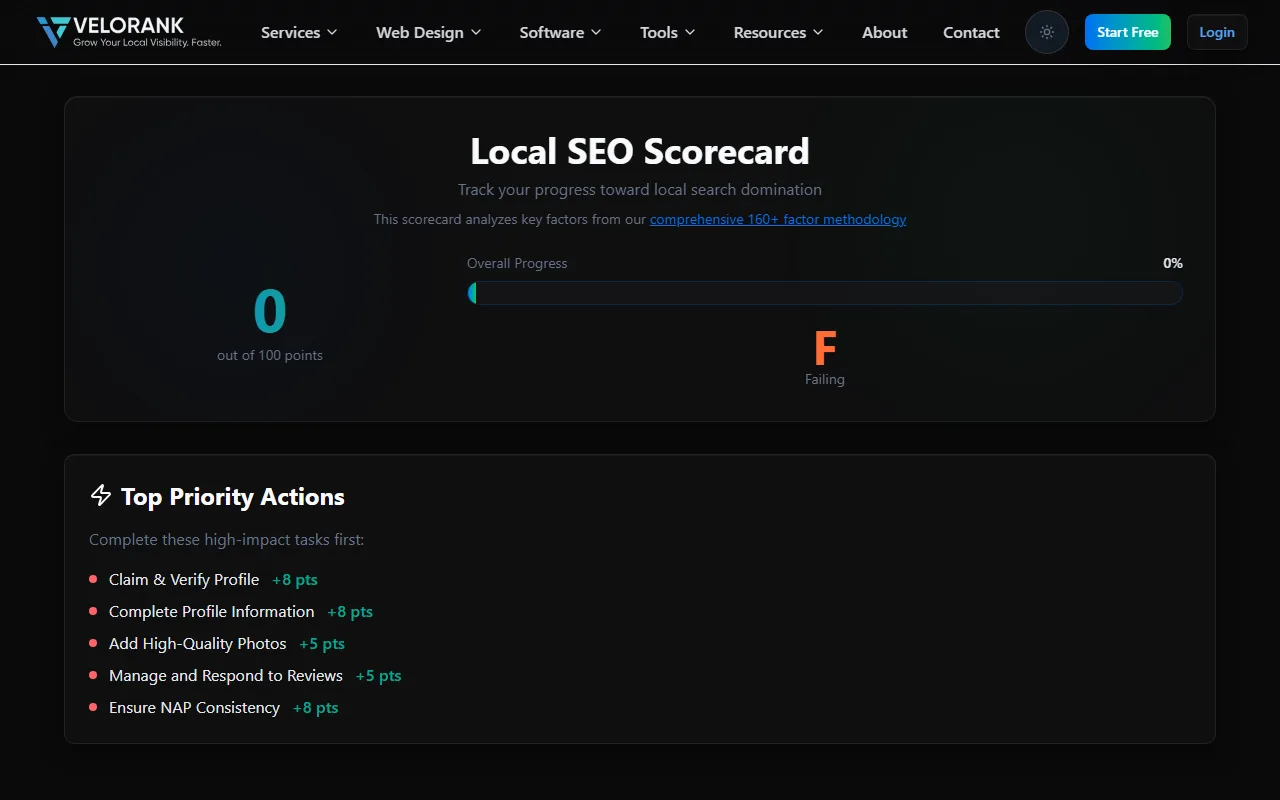
VeloRank's free SEO scorecard tool — run yours at /tools/scorecard.
How to Run Your Own SEO Report Card: Step-by-Step
You do not need to hire an agency to get a baseline SEO report card. Here is a practical process you can complete in an afternoon:
Step 1: Set Up Your Free Tools
- Google Search Console (crawl errors, indexing, Core Web Vitals)
- Google Analytics 4 (traffic, engagement, conversions)
- Google PageSpeed Insights (speed and UX)
- Ahrefs Webmaster Tools or Moz Free (backlinks)
- Screaming Frog SEO Spider — the free version crawls up to 500 URLs (on-page issues)
Step 2: Crawl Your Website Use Screaming Frog to crawl your site. Export the results and filter for:
- Missing or duplicate title tags
- Missing meta descriptions
- Broken links (4XX errors)
- Pages blocked from indexing
- Missing alt text on images
Step 3: Check Technical Health in Search Console Navigate to the Coverage report to see which pages are indexed, excluded, or erroring. Check the Core Web Vitals report for mobile and desktop scores.
Step 4: Audit Your Google Business Profile Search for your business name on Google. Review your profile for completeness, accuracy, and recent activity. Note your average star rating and the date of your most recent review response.
Step 5: Analyze Your Backlinks In Ahrefs Webmaster Tools, check your Domain Rating, total referring domains, and any flagged toxic links. Compare your link count to your top three local competitors.
Step 6: Score Each Category Create a simple spreadsheet with the six categories. Assign each a score from 1–10 based on your findings. Any category scoring below 6 is a priority for improvement.
Prefer a Single Number? The 100-Point SEO Scorecard
Some owners find letter grades per category easier to act on; others want one number they can track quarter over quarter. If you're in the second camp, weight the categories into a 100-point SEO scorecard like this:
| Category | Max Points |
|---|---|
| Technical SEO | 25 |
| On-Page SEO | 20 |
| Content Quality | 20 |
| Local SEO | 15 |
| Backlink Profile | 10 |
| User Experience | 5 |
| Analytics & Tracking (GA4, Search Console, conversion tracking in place) | 5 |
Then interpret your total:
| Score Range | Grade | What It Means |
|---|---|---|
| 85–100 | A | Excellent — maintain and build on your foundation |
| 70–84 | B | Good — a few targeted improvements will yield strong results |
| 55–69 | C | Fair — significant opportunities exist; prioritize technical and local SEO |
| 40–54 | D | Poor — foundational issues are limiting your visibility |
| Below 40 | F | Critical — your site needs a comprehensive SEO overhaul |
We don't have to guess where most SMBs land — we crawled the data. For our 2026 Minnesota local SEO statistics study, we analyzed 922 live Minnesota small-business websites and measured exactly the basics this scorecard grades: 87.7% had no LocalBusiness schema markup (n = 922), 41.3% had no visible phone number anywhere on the site (n = 922), and 27.7% didn't have a single H1 heading (n = 922). Mobile performance was worse — across a 94-site sample, 74% scored in Google's "poor" band on Lighthouse (n = 94).
Graded on the basics, most of the 922 Minnesota sites we crawled would fail these categories outright. That's not a guess about your business specifically, and it's not bad news — it means there's substantial room for improvement, and even modest gains translate directly into more traffic and leads.
Turning Grades Into a Plan: Prioritize by Impact and Effort
Not all SEO issues are created equal. Use a simple 2x2 matrix to decide what to fix first:
- High impact, low effort — Fix these immediately (e.g., missing title tags, unclaimed Google Business Profile)
- High impact, high effort — Schedule these as major projects (e.g., site speed overhaul, content strategy)
- Low impact, low effort — Batch these together (e.g., adding alt text to images)
- Low impact, high effort — Deprioritize or skip entirely
Then break your prioritized fixes into a 90-day sprint, with an owner, a deadline, and a success metric for each task. For most SMBs, a realistic 90-day plan looks like:
- Month 1: Technical SEO fixes + Google Business Profile optimization
- Month 2: On-page SEO improvements + content updates
- Month 3: Local citation building + review generation campaign
Don't want to wait until month one? VeloRank's Dakota County GMB optimization guide covers quick wins — starting with your Google Business Profile — that most small businesses can knock out this week.
Using VeloRank SEO to Automate Your Report Card
Doing this manually every month is time-consuming. That is where a dedicated SEO platform like VeloRank SEO adds significant value. VeloRank's free Local SEO Scorecard automates the entire audit process, pulling data from multiple sources and presenting it in a single, easy-to-read dashboard.
Key benefits for SMB owners:
- Automated monthly grading — Your report card updates automatically so you always have a current baseline
- Prioritized action items — Issues are ranked by estimated impact, so you always know what to fix first
- Local SEO monitoring — Tracks your Google Business Profile health, citation consistency, and map pack rankings
- Competitor benchmarking — See how your grades compare to your top local competitors
- Plain-language explanations — Every grade comes with a simple explanation and a recommended fix, no technical jargon required
For busy business owners who cannot afford to spend hours in spreadsheets, an automated SEO report card is not a luxury — it is a time-saving necessity.
What Good Grades Actually Look Like: A Benchmark Guide
Here is a practical grading benchmark for each category:
| Category | Grade A (Excellent) | Grade C (Average) | Grade F (Critical Issues) |
|---|---|---|---|
| Technical SEO | No crawl errors, fast load, clean sitemap | Minor errors, acceptable speed | Blocked pages, broken links, no HTTPS |
| On-Page SEO | Unique tags, proper headings, internal links | Some duplicate tags, thin content | Missing titles, no H1, keyword stuffing |
| Content Quality | In-depth, updated, E-E-A-T signals present | Adequate but thin, rarely updated | Duplicate, outdated, or auto-generated |
| Backlinks | Strong referring domains, clean profile | Few links, some low-quality | Toxic links, zero organic backlinks |
| Local SEO | Complete GBP, consistent citations, 4.5+ stars | Incomplete GBP, some citation errors | Unclaimed GBP, inconsistent NAP |
| User Experience | All Core Web Vitals pass, mobile-first design | Some CWV issues, mostly mobile-friendly | Fails CWV, poor mobile experience |
The Most Common SEO Report Card Failures (and How to Fix Them)
Failure #1: Unclaimed or Incomplete Google Business Profile
Fix: Claim your profile at business.google.com, complete every field, add at least 10 photos, and post an update at least once per month.
Failure #2: Slow Mobile Page Speed
Fix: Compress all images using a tool like Squoosh or ShortPixel, enable browser caching, and consider upgrading to faster hosting.
Failure #3: Duplicate Title Tags Across Multiple Pages
Fix: Give every page a unique title tag that reflects its specific content and target keyword. Use a spreadsheet to track and manage them.
Failure #4: No Backlinks from Local Sources
Fix: Start with low-hanging fruit — get listed in your local Chamber of Commerce, sponsor a local event, or reach out to local bloggers for a mention.
Failure #5: Thin Service Pages
Fix: Expand each service page until it thoroughly answers what a customer would actually ask before hiring you — FAQs, process explanations, local references, and customer outcomes. A page that's thin on substance needs real expansion, not padding.
How Often Should You Review Your SEO Report Card?
For most small businesses, a monthly review is the right cadence. Here is a suggested rhythm:
- Monthly: Review your automated report card, address any new critical issues, track rank changes
- Quarterly: Conduct a deeper content audit, refresh outdated pages, build two to three new backlinks
- Annually: Comprehensive strategy review — assess whether your keyword targets still align with your business goals and competitive landscape
Consistency is the key. SEO is not a one-time fix — it is an ongoing discipline. Businesses that review and act on their SEO report card regularly outperform those that treat SEO as a one-and-done project.
Your Action Plan: Start Grading Today
You now have everything you need to run a meaningful SEO report card for your business. Here is a quick summary of your next steps:
- Set up Google Search Console and Google Analytics 4 if you have not already
- Run a free crawl with Screaming Frog to identify on-page and technical issues
- Audit your Google Business Profile for completeness and accuracy
- Check your backlink profile with Ahrefs Webmaster Tools
- Score each of the six categories and identify your two biggest gaps
- Fix the most critical issues first — broken pages, missing title tags, unclaimed GBP
- Consider an automated tool like VeloRank SEO to keep your report card current without manual effort
The businesses that dominate local search results are not always the ones with the biggest budgets — they are the ones that consistently monitor, measure, and improve. Your SEO report card is the starting point for that process.
Ready to see your grades? Run VeloRank SEO's free Local SEO Scorecard and have your site fully evaluated in minutes — giving you a clear, prioritized roadmap to better rankings and more customers.

Best Local SEO Rank Trackers: Full Guide
Discover the best local SEO rank tracker tools, free local SEO audit options, and automation software to dominate Google Maps rankings.
Read the story ↗
Free Dofollow Backlinks Worth Building in 2026
A working list of free dofollow backlinks for 2026: journalist requests, software and agency directories, sites you control, and the profile sites worth checking. Compared with a December 2025 55-site roundup, with the conflicts left in.
Read the story ↗
SEO vs Digital Marketing: What Minnesota Small Businesses Actually Need
Confused about SEO vs digital marketing? Here's a plain-English breakdown for Minnesota SMBs, including when to pick one over the other and how much to budget.
Read the story ↗A little direction goes a long way
Put these ideas to work.
Talk with our team about improving your website and local search visibility.